Restaurant Website Guide: Menu, Hours, Ordering, Allergen Rules
 By Matthew Firth, founder of ModelBrain · Nov 22, 2026 · 8 min read
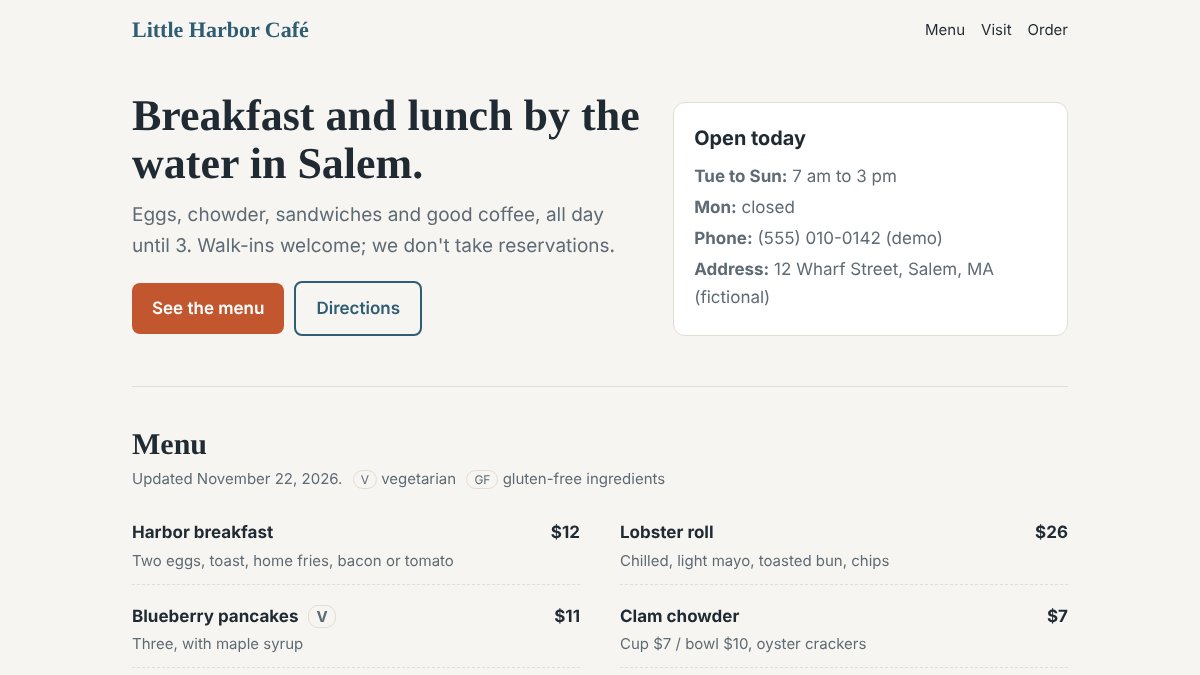
The short answer: most people visit a restaurant website on their phone to answer one of three questions: are you open, what's on the menu, and how do I order or book. Put your hours, address and phone at the top, your menu as real text rather than a PDF, and one clear button for ordering or reservations. Add any allergen notice your state requires. Below is what to include by type of business, the rules that apply, and a café demo built in one conversation.
What to lead with
| Business | Main button | Must-haves |
|---|---|---|
| Sit-down restaurant | Reserve, or Call if you don't take bookings online | Hours, menu, reservations link, private dining, parking |
| Café or counter service | Menu and Directions | Hours, menu, takeout and delivery links, Wi-Fi and seating notes |
| Food truck | This week's schedule | Locations and times, menu, book us for events |
| Caterer | Get a quote | Menus or packages, minimum order, service area, quote form |
Whatever the type, the first screen should show whether you're open now, where you are, and the one action you most want people to take. Your story and photos come after that.
Put the menu on the page, not in a PDF
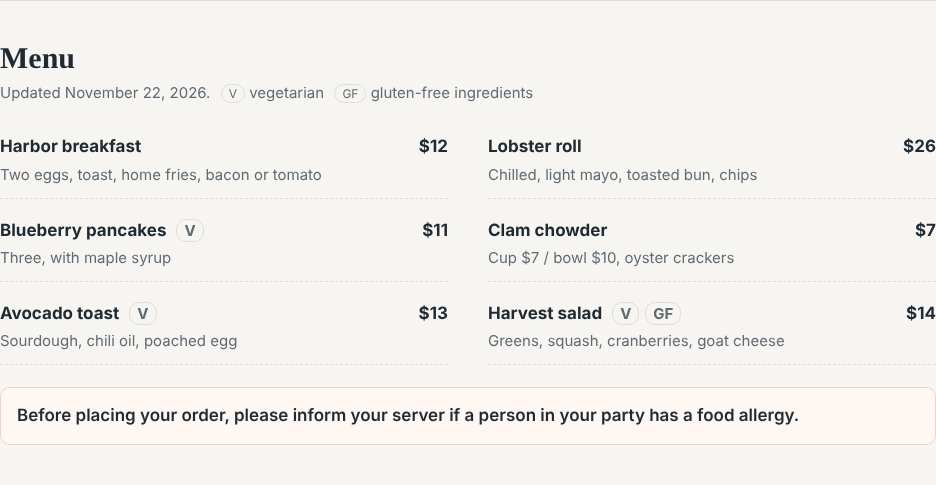
A PDF menu is hard to read on a phone, often goes out of date, and is easy for search engines and AI assistants to skip. Write the menu as text on the page instead, with each dish, a short description and a price. Mark vegetarian or gluten-free items with a simple, explained key, and put "Updated" and a date at the top so people trust it. If the menu changes daily, say so. A PDF can still be offered for printing, as an extra.
Ordering, delivery and reservations
You don't need your own ordering system to start. Link to the reservation and delivery services you already use, and make the phone number tappable. If you take catering or large orders, a simple request form that emails you is enough. What matters is that the button does exactly what it says, and that you check those links whenever you change providers.
Allergen and calorie rules
- Massachusetts requires printed menus and menu boards to carry this exact notice: "Before placing your order, please inform your server if a person in your party has a food allergy." An earlier state health department Q&A says menus posted on a website must carry it too, so put it on your online menu.
- Rhode Island also requires a food allergy notice on menus.
- Calorie counts are required by federal rules for restaurants that are part of a chain with 20 or more locations under the same name, including online menus where customers can order. Most independent restaurants aren't covered, but check your state and city.
- Everywhere, a clear allergy note and honest dietary labels are good practice. The major US food allergens are milk, eggs, fish, crustacean shellfish (such as shrimp, crab and lobster), tree nuts, peanuts, wheat, soybeans and sesame.
This is general information, not legal advice; check with your local health department.
Keep it findable and current
- Use the same name, address, phone and hours on your website and your Google Business Profile, and update both on holidays.
- Say whether you take reservations, walk-ins or both. It's one of the first things people want to know.
- List parking, step-free access and whether kids or dogs are welcome.
- Use photos of your real food and room, not stock images.
- Food trucks: keep the weekly schedule at the top, and update it before each week starts.
Build it by talking to an AI assistant
We built a demo for a fictional café in Salem, Massachusetts, Little Harbor Café, using Claude with ModelBrain Live, our product. One description of the café plus its menu, prices, hours and policies produced the site shown here: hours at the top, a text menu with a dietary key and the Massachusetts allergy notice, ordering and catering details, and parking and access notes. It's clearly labelled as fictional and hidden from search engines; see it at demo-cafe.modelbrain.app. Our guide to building a website with Claude shows each step and compares other ways to do it. For a bakery, see our bakery website guide.
Before you publish
- Hours, address and phone are on the first screen, and the phone number is tappable.
- The menu is text, with prices and a date.
- Every ordering and booking link goes to the right place.
- Your state's allergen notice is there, word for word, if one is required.
- It reads well on a phone, and the details match your Google Business Profile.
Common questions
What should a restaurant website include?
Your hours, address and phone at the top, a menu as real text with prices, how to order or book, parking and accessibility, and any allergen notice your state requires. Photos of your actual food help, and a date on the menu tells people it's current.
Should I put my menu on my website as a PDF?
Put it on the page as text instead. A text menu reads well on a phone, can be found by search engines and AI assistants, and works with screen readers. If you also offer a PDF for printing, keep it as an extra, not the only version.
Do small restaurants have to show calories on their menu?
Under federal rules, calorie labeling applies to restaurants that are part of a chain with 20 or more locations doing business under the same name. For those chains it covers online menus where customers can order. Independent restaurants usually aren't covered, though some states and cities have their own rules.
Do I need an allergen statement on my restaurant website?
It depends on your state. Massachusetts requires printed menus and menu boards to carry the exact notice "Before placing your order, please inform your server if a person in your party has a food allergy.", and state guidance has treated menus posted on a website the same way. Rhode Island requires a notice on menus too. Elsewhere a clear allergy note is good practice.
Do I need a website for my food truck?
It helps. A simple page with this week's schedule and locations, your menu and a way to book you for events saves you answering the same questions on social media every day. Keep the schedule section easy to update.
Can I build a restaurant website with AI?
Yes. Describe the restaurant to an AI assistant with your real menu, prices and hours, have it build the site, and check every detail before publishing. The café demo shown on this page was built that way.
Sources
- Massachusetts Department of Public Health, Food allergen awareness guidance (105 CMR 590.011).
- Food Allergy Research & Education, Food allergies and restaurants (Rhode Island).
- US Food and Drug Administration, Menu labeling requirements, and 21 CFR 101.11 (online menus).
- Massachusetts Department of Public Health, Allergen awareness regulation Q&A (website menus).
- Rhode Island General Laws, 23-20.12-2.
Last checked November 22, 2026. Written by Matthew Firth with help from an AI assistant; ModelBrain Live is our product.