How to Build a Website With Claude: First Prompt to Live Site
 By Matthew Firth, founder of ModelBrain · Nov 22, 2026 · 9 min read
The short answer: yes, Claude can build a website, and so can ChatGPT. On its own, Claude writes the pages and shows them in the chat; to put the site online at your own address with a form that reaches you, you connect a website service to the assistant and say "publish". Below are the options that exist today, then a real example: a demo bakery site taken from one sentence to a live link, with every step shown.
What "build a website with Claude" can mean
People mean three different things by it, and the right path depends on which you want.
- Write me the code. Claude, in the chat or in Claude Code, writes HTML and CSS you can save and upload to any host. You handle hosting, forms and the domain.
- Build it on a website platform. A builder such as Wix, Zarla or Shopify adds a connector to Claude or ChatGPT. The assistant drives the builder, and the site lives on that platform.
- Publish what the assistant writes. A hosting connector, such as ModelBrain Live, takes the pages your assistant wrote and puts them online, with forms and a domain handled for you. You keep talking to the assistant to change it.
If you only use ChatGPT on a paid plan and want a quick page for yourself, ChatGPT Sites is already there; our ChatGPT website builder page covers it in detail.
Your options, side by side
These are the routes that let you build and publish without leaving the chat. The table reports what each company says on its own pages; plans and prices change, so check before you choose.
| Option | Assistants | Hosting and address | Forms and inbox | Cost to start |
|---|---|---|---|---|
| Claude on its own | Claude | None. Claude writes the page and shows it in the chat; you host the files somewhere yourself | Not built in | Included in your Claude plan |
| ChatGPT Sites | ChatGPT | Hosted by OpenAI at an address ChatGPT generates; connect a domain you already own where available | Not described by OpenAI | Plus, Pro, Business or Enterprise; not Free or Go |
| Wix | ChatGPT (type @Wix) and Claude | A full Wix site, managed in Wix afterwards; OpenAI's listing says you can buy a domain from the chat | Wix's own business tools, managed in Wix | Wix account; Wix's own plans apply |
| Zarla | Claude, ChatGPT and other MCP apps | Hosted by Zarla; the draft stays private until you publish | Lead inbox in Zarla's dashboard (not readable from the chat) | Free to build and preview; pay when you publish |
| Shopify | ChatGPT and Claude | A Shopify store; the assistant can create it before you sign up, then you claim it | Store orders and customers in Shopify | Shopify's own plans apply |
| ModelBrain Live | Claude, ChatGPT (added from Plugins on chatgpt.com), Cursor and other MCP apps | yourname.modelbrain.app, or your own domain on paid plans | Every form emails you and lands in an inbox your assistant can read | Free for one site with a badge; Starter $12 a month |
There are more, such as B12 and Floot, which are also in Claude's connector directory. If you're comparing, ask each the same four questions: does a form message reach my email, can I use my own domain, can I see visitor numbers, and can I undo a change.
A real example, start to finish
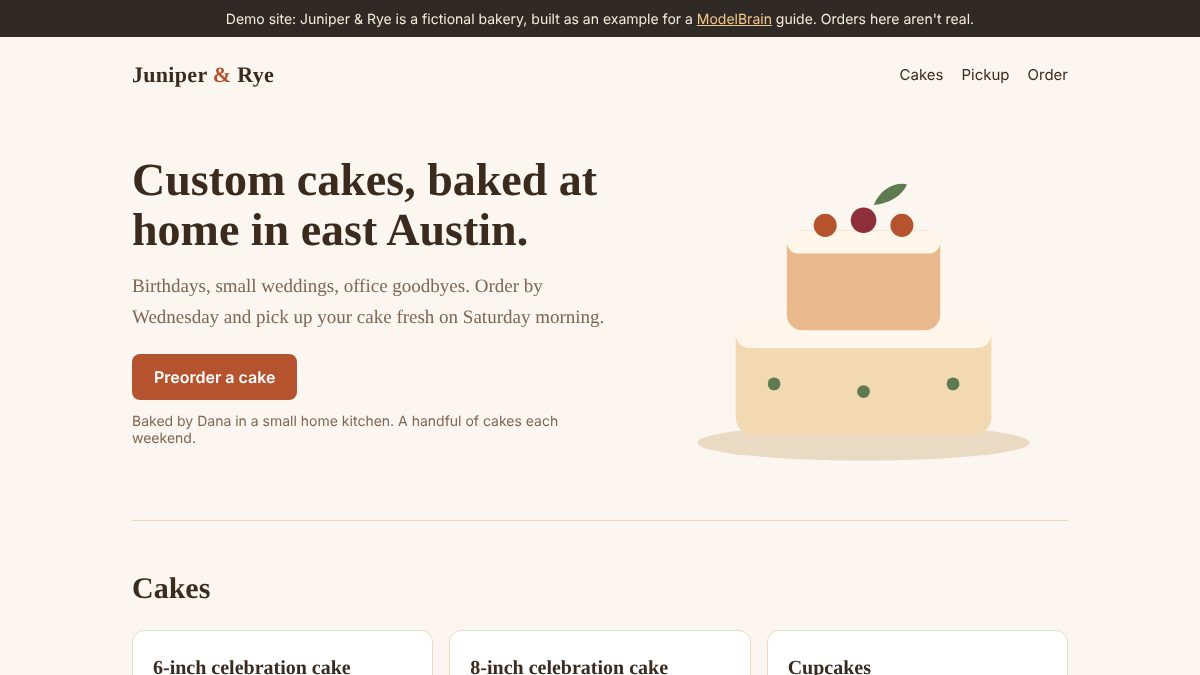
To show what the process actually looks like, we built a site for a fictional home bakery using Claude with the ModelBrain Live connector, on November 22, 2026. The steps and screenshots are exactly what happened; only the business details are invented. The business, owner and prices are made up, the site carries a banner saying so, and it asks search engines not to index it. You can open it at demo-home-bakery.modelbrain.app.
1. One sentence
The whole first request was:
"A home bakery in Austin that takes custom cake preorders for weekend pickup."
From that alone, the assistant built a first draft and put it up as a private preview: a link that isn't listed anywhere, valid for 24 hours. It had the right idea and the right structure, and blanks everywhere it couldn't know the answer.
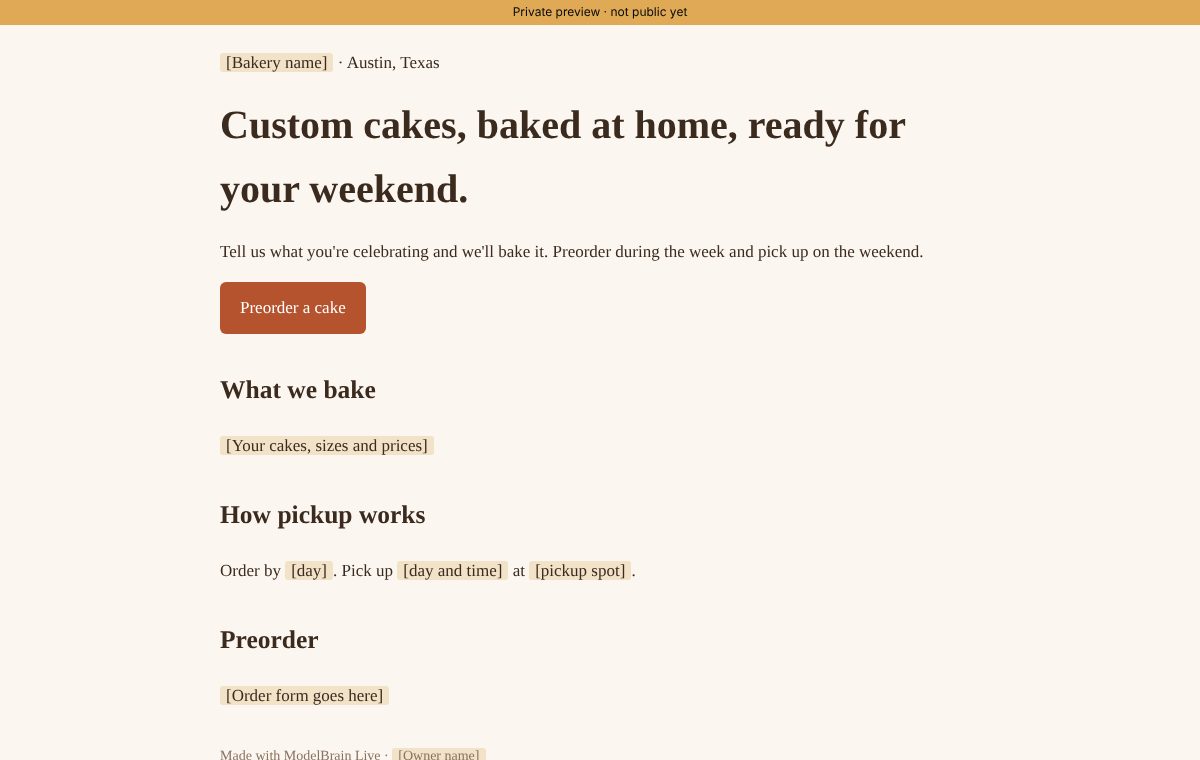
That's the most important lesson: your first draft is not your site. The assistant can't invent your prices, your pickup spot or your name, and it shouldn't try.
2. Five answers
Next, the assistant asks for what it couldn't guess. It needs five things, and for the demo we supplied made-up answers:
- Name and owner: Juniper & Rye, run by Dana.
- What you sell and for how much: 6-inch cakes $48, 8-inch $72, cupcakes $36 a dozen, a gluten-free sponge on request.
- Lead time and pickup: order by Wednesday, pick up Saturday 9 to 12 in east Austin, address sent on confirmation.
- How payment works: a half deposit to confirm, the rest at pickup.
- What customers should do: send a preorder with the cake, date and message.
3. The revised preview
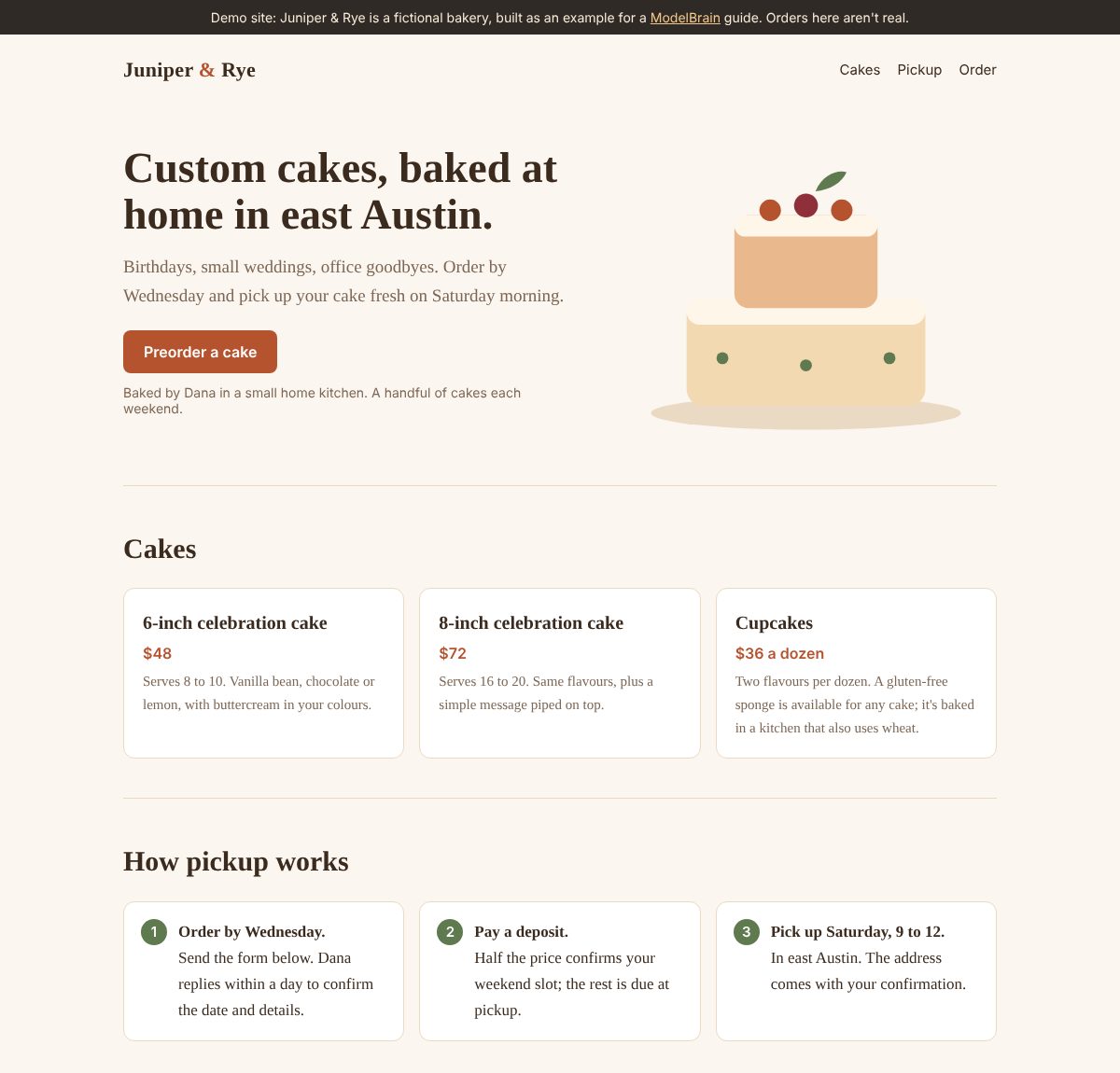
The second draft filled every blank, added a cake menu with prices, three pickup steps and a preorder form, and drew its own illustration rather than using stock photos. Checking it on a phone and a laptop turned up one small issue, an unstyled footer link, which took one more sentence to fix.
4. Publish, then test the form
We said "publish", and the site went live at its address within about 30 seconds. Then came the step most guides skip: we sent one clearly labelled test preorder through the form. It arrived in the site's inbox and by email, and the thank-you page loaded. If your form doesn't reach you, your website doesn't work, however good it looks.
5. Your own domain
For a real business the last step is an address like yourbakery.com. We didn't buy one for a fictional bakery. On Live, you ask your assistant to search for a name, it tells you the price, and once you approve it registers the domain in your name and connects it. Other services in the table above handle domains their own way.
All in, from the first sentence to a published site with a tested form took under fifteen minutes.
Before you publish: a checklist
- No placeholders left. Search the preview for brackets, "lorem" and "your business".
- Every fact is yours. Prices, hours, address, phone. The assistant will fill gaps confidently if you let it.
- No made-up reviews. If it writes testimonials, delete them until you have real ones. In the US, fake reviews are against FTC rules.
- Photos you can use. Your own, or properly licensed. Skip stock photos of strangers posing as your staff or customers.
- The form works. Send yourself a test after publishing, every time you change the form.
- It reads well on a phone. Many of your visitors will be on one.
- You can undo. Know how to roll back to yesterday's version before you need to.
How to write the first prompt
One good sentence beats a long brief. Include what the business is, where it is, and the one thing a visitor should do. Then let the assistant ask for the rest.
- "A mobile dog groomer in Tampa who takes bookings for home visits."
- "A one-person bookkeeping practice in Leeds that wants enquiries from small shops."
- "A church in Ohio that needs service times, a map and a newsletter signup."
If you're not getting results from one assistant, the same conversation can move to another for a fresh take; that's often quicker than rewording the prompt again.
Common questions
Can Claude build a website?
Yes. Claude can write a whole site from a description: the pages, the wording and the code. On its own it shows the result in the chat. To put it online at an address you control, with a form that reaches you, connect a website service as a connector, such as Wix, Zarla, B12, Shopify or ModelBrain Live, or upload the files to a host yourself.
Can I build a website with Claude on the free plan?
Yes, with a connector. Anthropic's free plan allows one custom connector, so you can add one website service and build from the chat. What you pay depends on the service you connect, not on Claude.
How long does it take to build a website with AI?
The first draft takes minutes. Our demo bakery went from one sentence to a published site with a working order form in under fifteen minutes, including one round of changes. Real details, photos and a domain add most of the time.
Is it legal to use AI to create a website?
Yes. Using an AI assistant to write and design your site is legal. What you publish still has to follow the usual rules: use photos and text you have the right to use, keep promises in your copy accurate, and add a privacy policy if your forms collect personal details. This is general information, not legal advice; rules differ by country.
Which AI is best for building a website?
Any capable assistant can write a good small-business site. The bigger choice is where it gets published: a connector that hosts the site and handles forms, a domain and updates matters more than which assistant writes the first draft.
Do I need to know how to code?
No. You describe what you want in plain words and ask for changes the same way. Knowing a little HTML helps if you ever want to edit by hand, but none of the steps on this page need it.
Sources
- OpenAI Help Center, Creating and managing ChatGPT Sites, and OpenAI's Wix plugin listing.
- Wix, Wix launches app in ChatGPT, and how to make a website with Claude.
- Zarla, Claude AI website builder.
- Shopify Help Center, Building and managing your store with third-party AI tools.
- ModelBrain Live, plans and features and the setup guide.
- The demo site, demo-home-bakery.modelbrain.app, built November 22, 2026.
Last checked November 22, 2026. ModelBrain Live is our product; the other options are described from their own pages. Written by Matthew Firth with help from an AI assistant.